There’s one thing about terminals that has always bothered me: to get your favorite editor, prompt, or TUI to render nicely, you are almost always forced to install a patched font.
You know the drill. You open a fresh terminal, pull up your editor, and half of the UI is replaced by little rectangles — the infamous tofu. The fix is to go download a Nerd Font, or Powerline, or some other patched set, and switch your terminal font to it. A font that is often well above 10MB in size1. All of that — just so you can render one icon, or maybe a handful of them.
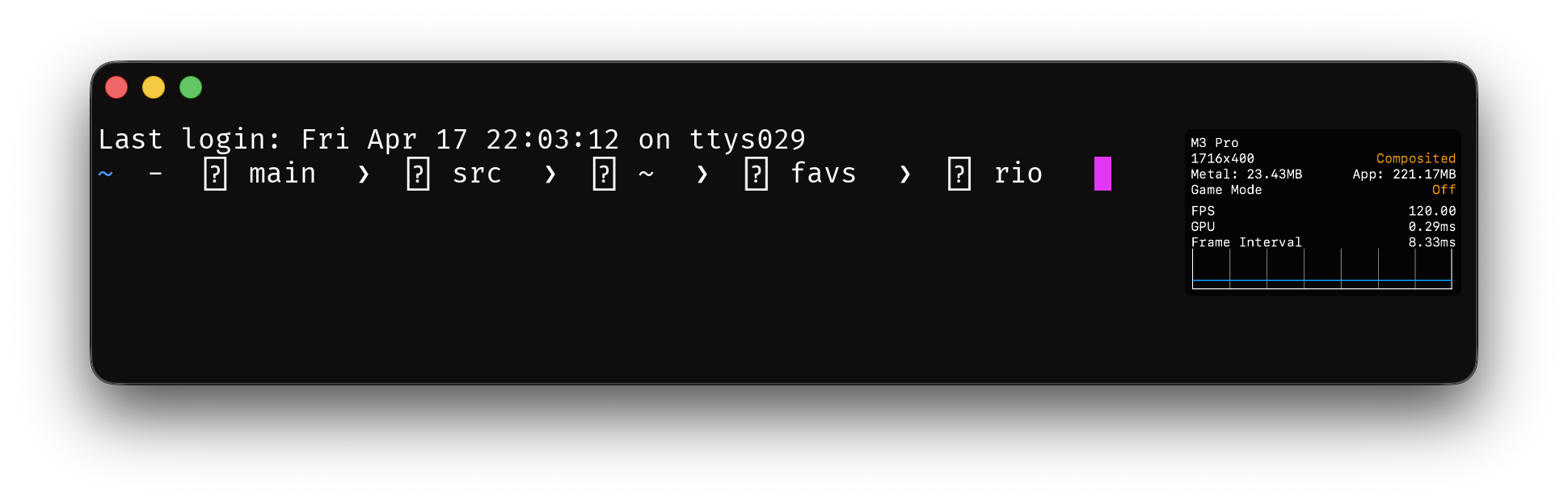
This is messed up. The bundle is huge, the workflow is clunky, and the application author has no way to ship the glyph they actually want. They can only hope the user has installed the right font, with the right version, mapping the right codepoints.
So I decided to do something about it.2
Glyph Protocol
Glyph Protocol is a terminal protocol that lets applications do two things:
- Register custom glyphs with the terminal directly, at runtime. The application picks a codepoint in the Unicode Private Use Area (where Nerd Fonts, Powerline, and every other icon convention already live), ships the vector outline, and emits the codepoint when it wants the glyph rendered.
- Query the terminal to ask whether a given codepoint is covered by a system font, by a registration in this session, by both, or by neither.
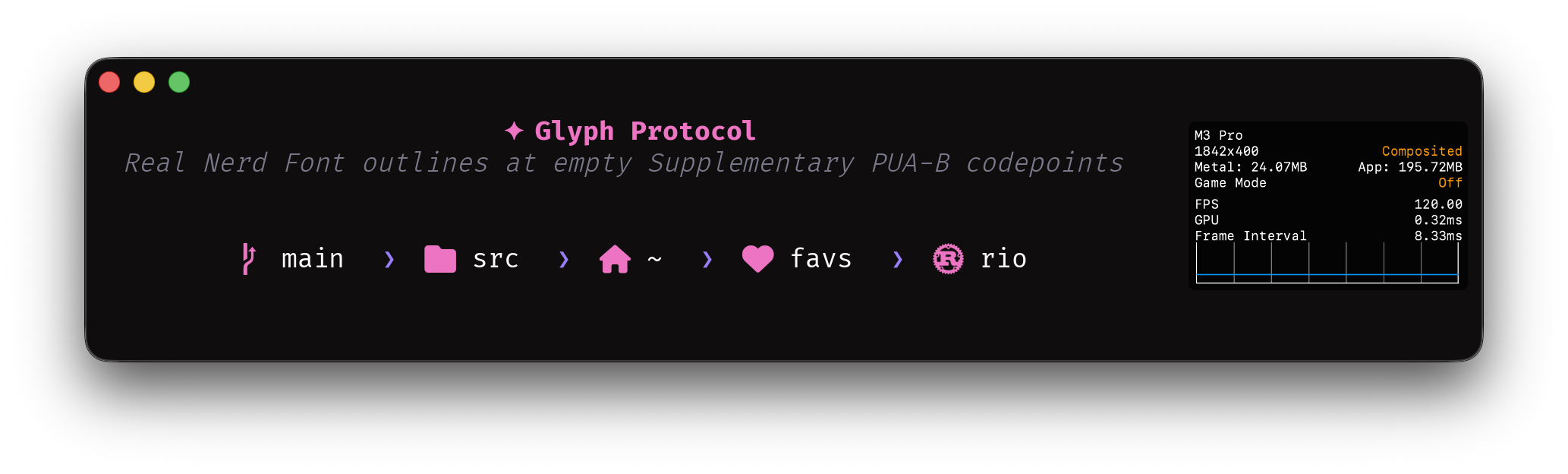
Instead of requiring every user to install a patched font so your TUI looks right, your application ships the glyph and re-uses a Nerd Font codepoint — or any PUA codepoint you like — to render it. If the user already has Nerd Fonts installed, a query lets you skip shipping your own glyph entirely; if they don’t, you ship the outline and the icon shows up anyway.
Why this matters
Fonts are a distribution problem disguised as a rendering problem.
The Nerd Font model works, but at a cost: users carry megabytes of glyphs they will never see, application authors are locked into a fixed set of codepoints in the Private Use Area, and any icon that is not in the font is simply not renderable. If you want to ship a new icon, you need the whole ecosystem to update.
Glyph Protocol flips this. The application ships the glyph. The terminal renders it. The user installs nothing.
It also means TUIs can be honest about what they need. Right now, an editor that uses a Nerd Font icon for “git branch” has no way of knowing if the user actually has a Nerd Font installed — it just draws the codepoint and hopes. With a query, the application can ask first and fall back gracefully when the answer is no.
The shape of the protocol
Transport. The protocol uses APC (Application Program Command) rather than OSC. APC is designed for exactly this case: application-defined commands that terminals which don’t implement the protocol can safely ignore, without fighting over OSC’s shared numeric namespace3.
Identifier. Every Glyph Protocol message is prefixed with the codepoint 25a1 (U+25A1, WHITE SQUARE) — the character a terminal draws when it has no glyph for something, the canonical symbol of tofu. Terminals that don’t recognize this prefix drop the message.
The framing looks like:
ESC _ 25a1 ; <verb> [ ; key=value ]* [ ; <payload> ] ESC \
Four verbs to start: s for support, q for query, r for register, and c for clear.
Support: what does the terminal implement?
Before registering anything, an application needs to know what the terminal supports — which payload formats it can rasterize, which protocol version it speaks. This is also the canonical way to detect Glyph Protocol at all: the verb takes no parameters and costs one round-trip.
Client sends:
ESC _ 25a1 ; s ESC \
Terminal replies:
ESC _ 25a1 ; s ; fmt=glyf ESC \
fmt is a comma-separated list of format names. Order is not significant, and clients ignore names they don’t recognise, so the set can grow over time without breaking older clients.
| Name | Meaning |
|---|---|
glyf |
TrueType simple glyphs. Required in v1. |
colrv0 |
Layered flat-colour glyphs (OpenType COLR v0). Added in v1.2 — see Colour glyphs below. |
colrv1 |
Full paint graph with gradients and transforms (OpenType COLR v1). Added in v1.2. |
Future formats extend the list with new names. The list was a u8 bitfield until v1.8 (2026-05-03); names are easier to read in transcripts and don’t worry about bit collisions.
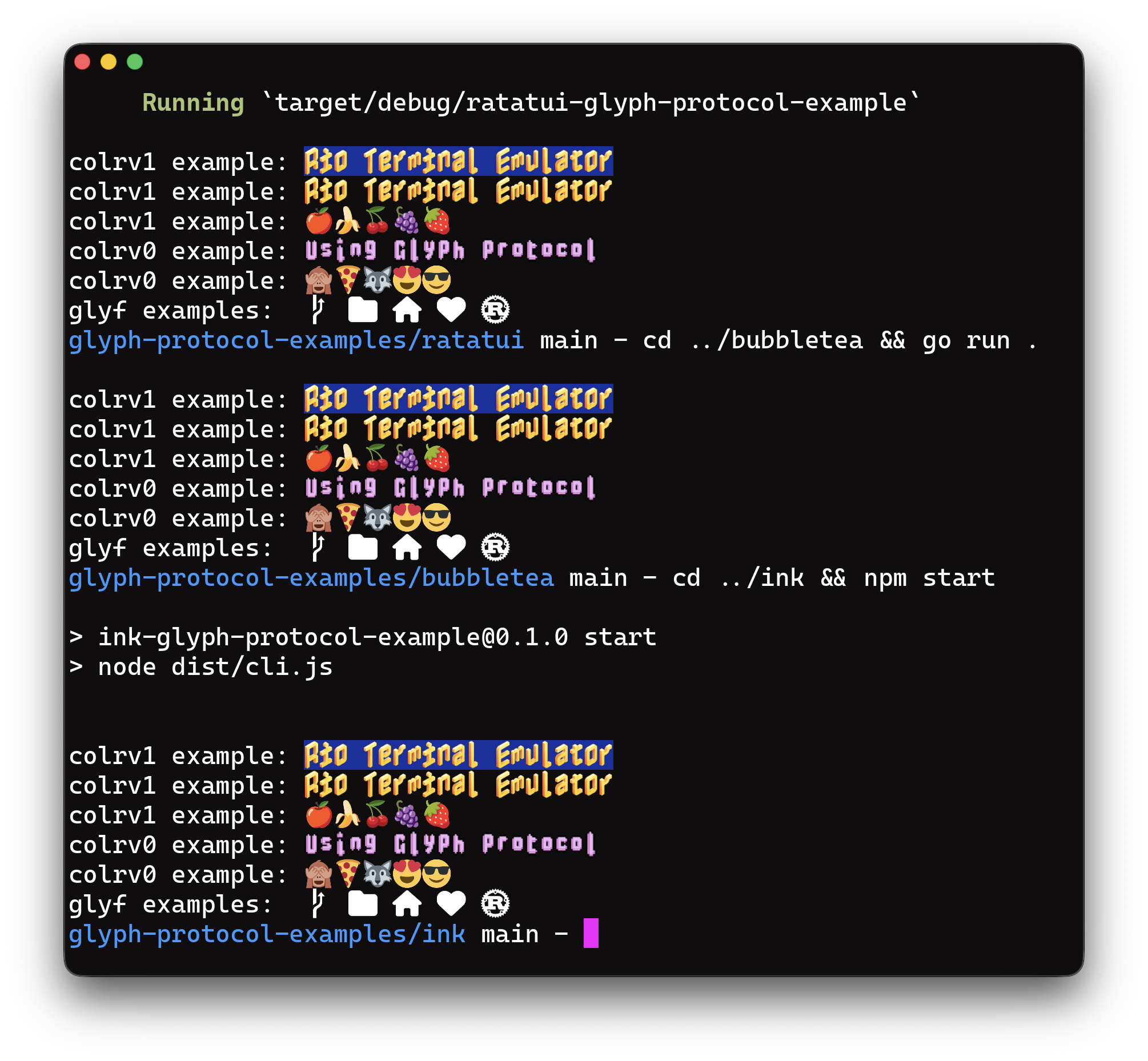
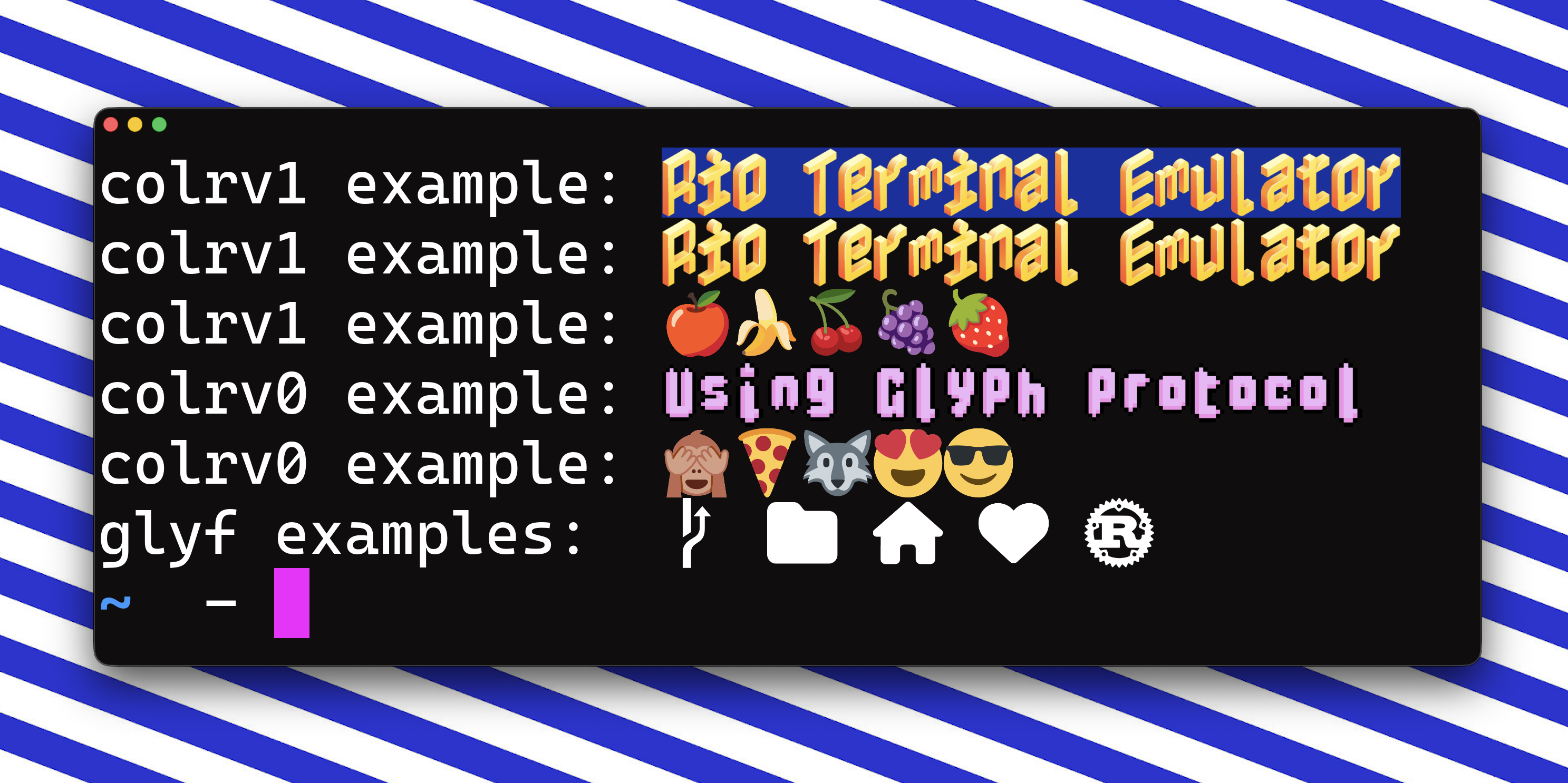
colrv1 titles and fruit emoji, colrv0 titles with face and animal emoji, and monochrome glyf icons at the bottom. Same registration, rendered from ratatui (Rust), bubbletea (Go), and ink (Node). Colour is covered in depth below.Any reply at all confirms the terminal implements Glyph Protocol; if nothing arrives within a short timeout, it does not. An empty fmt= value means the terminal speaks the protocol but advertises no formats — defined for completeness, not expected in practice. Clients that need glyf (v1’s only defined payload) check that glyf is in the list before sending any r requests.
Query: who can render this codepoint?
An application wants to know if the current font — whether a system-installed font or a registration in this session — can render U+E0A0 (a Powerline branch icon).
Client sends:
ESC _ 25a1 ; q ; cp=E0A0 ESC \
Terminal replies:
ESC _ 25a1 ; q ; cp=E0A0 ; status=system ESC \
status is a comma-separated list of the sources covering this codepoint:
status= value |
Meaning |
|---|---|
| (empty) | Nothing renders this codepoint. The cell will show tofu. |
system |
A system font covers it. |
glossary |
A glossary registration in this session covers it. |
system,glossary |
Both cover it; the registration shadows the system font at render time. |
Like fmt, this was a u8 bitfield until v1.9 (2026-05-03); names read more naturally in transcripts and don’t pin the protocol to a closed two-source model.
With this, a TUI can ask first and fall back gracefully — skip registering its own branch icon when the system already has one, register and emit a custom codepoint when it doesn’t. Protocol detection itself is handled by the s verb above.
Register: ship your own glyph
An application wants to ship its own branch icon. It picks a PUA codepoint — here U+E0A0, the Powerline convention — and sends the glyf outline (the same TrueType vector format fonts have used for forty years) base64-encoded:
ESC _ 25a1 ; r ; cp=E0A0 ; upm=1000 ; <base64-glyf> ESC \
Parameters:
cp— the target codepoint in hex. Must be in one of the three Unicode Private Use Area ranges (U+E000–U+F8FF,U+F0000–U+FFFFD, orU+100000–U+10FFFD). Anything else is rejected withreason=out_of_namespace. See “Why the terminal restricts to PUA” below.fmt— payload format. Optional;glyfis the only value defined in v1 and is the default, so most registrations can omit it entirely.upm— units per em, the coordinate space the outline is authored in. Optional; default1000.- payload — base64-encoded
glyfsimple-glyph record.
The terminal acks:
ESC _ 25a1 ; r ; cp=E0A0 ; status=0 ESC \
From this point on, whenever the application emits U+E0A0 its registered glyph renders at that cell. A second r on the same cp overwrites the first. On error (non-PUA codepoint, malformed payload, composite glyph, etc.) the reply carries status=<nonzero>; reason=<code>.
Why vector? Because a glyph is not a photograph. It has no fixed size: the same icon needs to render at 12px in a dense TUI and at 24px on a HiDPI display, and anything that bakes in a resolution is making that decision wrong on at least one of them. A raster glyph at 128px that looked crisp on your laptop will be blurry on the external monitor, and illegible at 9px in a status bar.
And why glyf specifically? Because every terminal that renders text already has a glyf rasterizer linked. FreeType, swash, ttf-parser, fontdue, allsorts — the renderer is already there, in every language terminals are written in. Adopting Glyph Protocol adds zero new dependencies on the terminal side. By contrast, adopting SVG would mean pulling in resvg or writing a new XML+path parser.
glyf is also small on the wire. A typical icon is 150–400 bytes of glyf data — 2–3× smaller than the equivalent SVG, base64 overhead included. For an application that registers fifty icons at startup, that is the difference between a 13KB and a 35KB burst of APC traffic. On a saturated tmux pipe or a mobile SSH link, you feel that.
A quick primer on glyf. If you have never opened the TrueType spec, here is the thirty-second version.
A glyf record stores a glyph as a set of closed contours. Each contour is a sequence of points, and every point carries a single bit of metadata: on-curve or off-curve. The rules for walking a contour are straightforward:
- Two on-curve points in a row → straight line between them.
- An off-curve point sitting between two on-curve points → quadratic Bézier, with the off-curve point as the control point.
- Two off-curve points in a row → there is an implied on-curve point at their midpoint. This is a compression trick: a chain of off-curve points encodes a smooth curve using roughly half the vertices of the explicit form.
Coordinates are integer grid positions in the EM square. At upm=1000, a point at (500, 900) sits at half-width, ninety percent of the way up. The wire format packs points tightly: a flag byte per point (with a repeat bit that compresses runs of identical flags), followed by delta-encoded x and y coordinates stored short (1 byte) when they fit in a signed byte and long (2 bytes) when they don’t. A closed triangle fits in about thirty bytes. A thirty-point icon fits in about two hundred.
That is the entire format. The authoritative references are the OpenType glyf spec (Microsoft) and the Apple TrueType Reference Manual, Chapter 6 — both readable in an afternoon, both implemented correctly a hundred times over in existing libraries.
The subset. Glyph Protocol does not require terminals to implement the full glyf table. The spec defines a constrained subset:
- Simple glyphs only. No composite glyphs, no references to other glyphs, no font-level context.
- Standard flag encoding as defined by the OpenType spec (on-curve, off-curve, x-short, y-short, repeat).
- No hinting instructions. Everything interesting about hinting assumes a font-wide set of control values that does not apply here.
- Coordinate space defined by
upm— defaults to 1000, can be overridden per registration. The terminal maps this space onto its cell at render time.
Simple glyphs are the subset of glyf that any ttf-parser-style library already reads in about three hundred lines. Composite glyphs and hinting are where TrueType gets thorny; both are excluded.
Color behavior. glyf outlines have no color. The terminal renders them in the current foreground color — which is the Nerd Font inheritance case, the primary use case for this protocol. Coloured glyphs (status badges, multi-color logos) ship as a separate payload format, fmt=colrv0 / fmt=colrv1 — see Colour glyphs below.
Scaling and cell metrics. The upm value defines the glyph’s coordinate space; the terminal maps that space onto its cell at render time. An icon authored at upm=1000 will scale cleanly to an 8×16 cell and to a 32×64 cell. The application does not need to know the terminal’s cell size, and never has to re-register on font size change.
Authoring. Most application authors will not hand-write glyf bytes. They will start from SVG (what their designer hands them, what every icon library ships) and convert it at build time. fonttools already does this via its ttx/pens interface, and I will ship a small svg2glyf helper alongside Rio’s reference implementation so the conversion is a one-liner. Runtime registration is then as simple as loading the bytes and sending them.
Lifetime and capacity. Each terminal session carries a glossary of at most 1024 simultaneous registrations, keyed by codepoint anywhere in the three PUA ranges. Registrations live for the duration of the session. If an application registers a 1025th glyph, the terminal evicts the oldest registration in FIFO order — there is no “glossary full” error to handle. Applications that cannot tolerate silent eviction should query their codepoint before emitting.
A worked example: an icon in empty PUA
To make this concrete, here is the full pipeline for registering a stylised outline and rendering it. The codepoint in the example is U+100000 — the first codepoint of Supplementary PUA-B, which no known font covers. That makes the demo unambiguous: what you see is the outline you shipped, nothing else.
We’ll use fontTools as the SVG-to-glyf converter — the de facto Python toolkit for OpenType work.
# register_icon.py
import base64, sys
from fontTools.pens.ttGlyphPen import TTGlyphPen

# Draw the outline in glyf coordinate space (upm=1000, Y-up).
pen = TTGlyphPen(None)
# ... pen commands ...
pen.closePath()

payload = base64.b64encode(pen.glyph().compile(None)).decode("ascii")

# Register at U+100000 — empty PUA, no system font claims it.
sys.stdout.write(f"\x1b_25a1;r;cp=100000;upm=1000;{payload}\x1b\\")
sys.stdout.flush()

# Emit the codepoint. The word "icon: " passes through unchanged;
# the final cell renders our outline.
sys.stdout.write(f"icon: {chr(0x100000)}\n")
The application doesn’t need to read the reply before printing — it chose the codepoint, so it already knows what to emit. The glyf payload for a typical 20-point icon lands around 150 bytes; base64-encoded and wrapped in an APC, under 250 bytes on the wire.
For application authors who already have SVG assets, a helper like svg2glyf (shipping alongside Rio’s reference implementation) collapses the whole thing to two lines:
from glyph_protocol import register_from_svg
register_from_svg(cp=0x100000, svg_path="icon.svg")
print(f"icon: {chr(0x100000)}")
A knob for bulk registration: reply=
By default the terminal ACKs every r with status=0, and error replies carry a reason= code. Great for an interactive one-off registration. Bad for a startup hook that registers 100 glyphs and then exits — the 100 queued ACKs drain out of the PTY into whatever shell inherits it, as visible junk on the user’s next prompt.
Three levels:
reply= |
Meaning |
|---|---|
1 |
Default. Emit both success (status=0) and failure replies. Use for interactive one-off registrations. |
2 |
Emit failure replies only; success is silent. Use for bulk registration where you still want to learn about the broken ones. |
0 |
Emit nothing. Fire-and-forget. Use for startup hooks that won’t be around to read a reply. |
ESC _ 25a1 ; r ; cp=E0A0 ; reply=0 ; upm=1000 ; <base64-glyf> ESC \
Unknown values silently fall back to reply=1, so a future level extension (say, reply=3 for “success only”) can ship without breaking old clients.
Clear: free a slot
Sometimes you want to undo a registration — when an editor exits and wants to return the terminal to its defaults, when a TUI swaps themes, or when you are debugging. The c verb handles this.
Clear a single slot:
ESC _ 25a1 ; c ; cp=E0A0 ESC \
Clear the entire glossary:
ESC _ 25a1 ; c ESC \
The terminal acks with status=0 whether the slot was occupied or not — clearing an empty slot is not an error, it is a no-op. The cp parameter must be in one of the three PUA ranges; anything else returns reason=out_of_namespace.
What is intentionally not in v1
- No non-PUA codepoints. Registration is restricted to the three Unicode Private Use Area ranges — see “Why the terminal restricts to PUA” below.
- No ligatures. Registration applies to a single codepoint. Sequence-keyed substitution is out of scope for v1; programming ligatures like
->→⟶are already handled by OpenType fonts and don’t need to become an attack surface here. - No persistence across sessions. Glyphs are shipped fresh on each run. This avoids turning the terminal into a font cache with eviction policies and upgrade paths.
- No cross-application sharing. Each terminal session owns its glossary. No IPC, no daemon.
- No colored glyphs in v1’s
glyfpayload.glyfoutlines render in the current foreground color. Multi-layer and paint-graph colour landed in v1.2 as the separatefmt=colrv0/fmt=colrv1payloads — see Colour glyphs below.
Each of these can be added later if it turns out to be needed. None of them can be easily removed once added.
Colour glyphs
A glyf outline renders in a single colour, and for the Nerd-Font case that is exactly right. But a whole class of modern iconography — a red heart, a green status dot, a multi-colour brand logo — needs more than one colour per glyph. That landed in v1.2 as two additional payload formats, advertised through fmt exactly like glyf.
Two formats, not one
Colour glyphs are a well-travelled design space. OpenType already solved it, in two ways:
colrv0is the simple one: a base glyph references a list of layer glyphs and per-layer palette indices. Each layer is a flat colour. Layers composite front-to-back. No transforms, no gradients, no blend modes. Powers most Windows 10 emoji and is about ten years old at this point.colrv1is the ambitious one: a full paint graph. Nodes are linear, radial, and sweep gradients; affine transforms; composite modes; layer groups; references to other glyphs. Powers the Google Noto emoji and Chrome’scolrv1implementation.
Glyph Protocol takes both. They don’t compete; they’re tiered. A terminal that only implements the simple case gets a useful subset of colour; a terminal that goes all-in gets Apple-quality emoji. Applications advertise the format they’re shipping (via fmt on the r verb) and the terminal advertises what it supports (in the s reply); the two negotiate without a round-trip per glyph.
Reuse, don’t reinvent
The observation is the same one that motivated using glyf for monochrome in the first place: every terminal that renders OpenType already has a parser for this.
ttf-parser’s colr::Table::parse(cpal, colr) accepts a standalone COLR + CPAL blob with no surrounding font context required. skrifa (the parser behind Chrome’s colrv1 renderer) does the same. Both walk colrv0 and colrv1 through a shared Painter/ColorPainter callback trait. Outside Rust the same job is one library call away: HarfBuzz walks both through hb_paint_funcs_t and is already linked into every Pango/GTK-based terminal; FreeType handles both in C and is the default text-shaping dependency on basically every Linux distribution; Skia ships the colrv1 renderer Chrome itself uses; fontTools covers Python; and Apple’s CoreText and Microsoft’s DirectWrite handle it natively at the OS level. Adopting OpenType binary means the protocol gets a paint-graph parser and walker for free, in every mainstream language.
The catch: a COLR table is useless on its own. It only contains layer and colour references — the actual glyph outlines live in the font’s glyf table, addressed by GlyphId. Glyph Protocol ships one glyph at a time, not a full font, so it wraps the COLR + CPAL tables in a tiny container that also carries the outlines each layer references:
u16     n_glyphs
repeat n_glyphs:
  u16   glyf_len
  glyf_len bytes              # simple-glyph, same subset as fmt=glyf
u16     colr_len              # OpenType COLR table (colrv0 or colrv1)
colr_len bytes
u16     cpal_len              # OpenType CPAL table (may be 0 for colrv1)
cpal_len bytes
GlyphId values in the COLR table index into the outline array. paletteIndex values in layer records index into the CPAL colour records. paletteIndex = 0xFFFF means “use the current foreground colour,” per the OpenType spec — so a colour glyph can still inherit the theme where it wants to. That’s the whole contract; the rest is COLR’s job. The container adds 16 bytes of length-field overhead for a five-layer icon, plus ~70 bytes of fixed COLR + CPAL headers — negligible next to the outline data itself.
Registering a colour glyph
Same r verb as monochrome, but fmt selects the payload format:
ESC _ 25a1 ; r ; cp=E0A0 ; fmt=colrv0 ; upm=1000 ; <base64-container> ESC \
Everything else is unchanged. One codepoint consumes one slot regardless of payload: a fmt=colrv1 registration carrying 500 inner outlines still eats exactly one of the glossary’s 1024 slots. And as with glyf, every accepted format is vector — there is deliberately no sbix/CBDT bitmap path, because a bitmap optimised for a 12px tmux cell is wrong on a 32px HiDPI desktop.
Authoring colour payloads
Most applications will not hand-craft COLR tables. Two tools make the pipeline straightforward:
nanoemoji— Google’s SVG →colrv1compiler, originally built for Noto emoji. Feed it a directory of SVGs, get a.ttfback. Slice theCOLR,CPAL, and referencedglyfoutlines out of that TTF withfontTools, pack them into Glyph Protocol’s container, and register.fontTools— for pulling COLR data out of existing colour fonts (Noto Color Emoji, Fluent Emoji, Twemoji-via-COLR).
Anything that can emit a COLR + CPAL pair and the underlying outlines can produce a valid payload.
Two colour-specific threads are still open rather than in v1.2: a way to upload a CPAL palette once and reference it by ID across registrations (emoji families like Twemoji or Noto reuse the same ~50-entry palette on every glyph, and shipping it inline each time wastes thousands of bytes), and Lottie as a future payload format for motion.
Why the terminal restricts to PUA
The PUA restriction is not an API aesthetic. It is the property that makes the protocol safe to turn on by default.
Consider the alternative, where registration accepts any codepoint. A program could write to the terminal:
Register this
o-shaped glyph at codepointU+0061(a).
Now every a the user sees on screen looks like o. bad.com reads as bod.com. The cell buffer still contains bad.com — so when the user copies and pastes, the bytes are honest — but what they read is a lie. Every program that writes to a terminal suddenly has a phishing primitive, and the effect persists across whatever runs next in that session. Running cat sketchy.txt from your shell could change how git status looks five minutes later.
Constraining cp to the three Unicode Private Use Areas — U+E000–U+F8FF (basic), U+F0000–U+FFFFD (supplementary A), U+100000–U+10FFFD (supplementary B) — makes the whole class of attack mechanically impossible. Users never type PUA codepoints. Existing text — filenames, URLs, commands, variable names, log lines — doesn’t contain them. A program that registers a glyph can only affect how PUA codepoints render, and PUA codepoints only appear in text the same application (or another one opting into the same convention) has deliberately emitted. The user’s a stays an a. Their URLs, paths, and shell output render exactly as their bytes say they should.
This is essentially the same trust model Nerd Fonts established by convention — custom glyphs live in a reserved range, never over real text. Glyph Protocol takes that convention and makes it load-bearing.
Two smaller properties round this out:
- The cell buffer is authoritative. Selection, copy, search, hyperlink detection, shell history, and anything else that extracts text MUST return the codepoint the application emitted, never the rendered glyph. An application cannot use this protocol to create a “what you see is not what you copy” trap.
- Sessions are isolated. Two tabs can independently register
U+E0A0for different branch icons. One tab’s registrations cannot affect another’s rendering.
Compared to what’s already there
Two things come up the moment you describe the protocol to anyone who has spent time in terminal internals: can’t you already do this with the Kitty Image Protocol? And isn’t there a forty-year-old answer to this from DEC? Both are worth addressing directly.
Kitty Image Protocol with Unicode placeholders. KIP with Unicode placeholders can approximate Glyph Protocol: you upload an image, then place it at a cell by emitting a reserved placeholder codepoint that the image ID hangs off. It works, sort of. In practice the integration is fiddly, and only Kitty, Ghostty, and Rio implement placeholders at all, so a TUI that targets it still ships a code path that runs on a handful of terminals.
The deeper reason KIP is the wrong hammer is that KIP is an image protocol. A glyph is not an image.
- Cost per use. A custom glyph reused two hundred times on a screen (table borders, bullet markers, status ticks, a logo in every window header) has to be placed as two hundred image references, each one carrying layout and compositing cost. Once Glyph Protocol has registered a codepoint, the terminal draws it through the same glyph cache it uses for
a: you emit the codepoint and it renders at font speed. If a glyph is used like a character, it needs to render like a character. - No native resolution. A
glyfoutline has no pixel size. The terminal rasterises it at whatever size the current cell is, so font size change (Ctrl+= on a whim, an external monitor plugged in, a zoom toggle) just works. With KIP you shipped a bitmap at a specific size, and on font size change you are stuck: either re-upload the image or watch it blur. And there is no clean way for a TUI to even notice that the font size changed short of polling. KIP itself has no signal for that. - Foreground colour inheritance. A monochrome
glyfoutline renders in the cell’s current foreground, so the same git-branch icon picks up your theme without any protocol-level colour negotiation. An image is its own pixels and does not participate in text colouring at all.
Glyph Protocol is intentionally not an image protocol. It ships a font glyph at runtime, and that narrower promise is what lets it be cheap.
DEC DECDLD / DRCS. The other obvious prior art is four decades old: the VT220 shipped Dynamically Redefinable Character Sets in 1983, and the VT320/VT510 kept refining the story under the DECDLD (Dynamically Redefinable Character Sets, Downline Load) sequence. An application uploads a glyph, the terminal renders it when it sees the associated character. A handful of terminals still support it: xterm takes DECDLD sequences, and mlterm has a more complete implementation.
Shape-wise, DECDLD looks a lot like Glyph Protocol on the surface. It has two problems that Glyph Protocol was designed specifically not to inherit.
- It is bitmap. You upload a grid of pixels sized to the terminal’s current cell. The moment the user changes font size, bumps HiDPI, drags the window to a 4K monitor, or switches zoom level, the glyph is wrong: scaled-up blocky pixels on one display, shrunk-down mush on another. Bitmap made sense when terminal cells were a fixed 10×20 pixels on a CRT and nothing ever changed size. It does not survive today’s range of cell sizes. Vector is the missing piece, and that’s most of what Glyph Protocol is.
- There is no namespace restriction. DECDLD lets an application overwrite a loaded character set and, depending on charset designation, that set can be mapped into GL (the range where
a,b,clive). An untrusted program writing to the terminal can redefine whatarenders as. The cell buffer still containsa, so copy-paste is honest, but what the user reads is a lie:bad.comcan be made to look likebod.com. Glyph Protocol pins registration to the three Unicode Private Use Areas for exactly this reason (see “Why the terminal restricts to PUA” above), which is what makes it safe to leave on by default. DECDLD never got that restriction, and it is the single biggest reason modern terminals are reluctant to enable it.
Landing in Rio
Glyph Protocol is already available on Rio terminal’s main branch and will land somewhere in May — the first implementation. The full spec is published alongside the release, along with example code for registering glyphs and querying the terminal from your own applications.
For working examples, see raphamorim/glyph-protocol-examples — it contains sample integrations for Bubble Tea, Ratatui, and Ink.
That said, the protocol is still likely to see updates. Expect the shape of messages, the query responses, and some of the edge cases to change as more applications start using it and as other terminals weigh in. If you build against it now, treat it as a moving target and pin the version you are implementing.
My hope is that other terminal emulators will adopt it. The win for the ecosystem is big, and the implementation surface is intentionally small.
More soon.
Open questions
A few threads came out of the initial conversation about this post that are worth putting to the community. I’d be curious to hear what folks think:
-
Should font-size change be something the protocol notices? Glyph Protocol itself dodges this because outlines are resolution-independent, but everything around it still cares. A TUI that composes images next to glyphs wants to know when the cell metrics changed, and today has no way to learn that short of polling terminal size. Is a
resizeormetrics-changednotification in scope, or scope creep? -
Is there a responsible way to allow non-PUA registration? The PUA-only rule makes the whole protocol safe by default. It also rules out uses like a CJK input method shipping a glyph for an uncovered ideograph, or a language-specific tool overriding a glyph it knows the user wants. Is there a shape (an explicit user-level opt-in, a signed capability, a trusted-origin flag) that would unlock those use cases without re-opening phishing?
-
Should registration scope be configurable? The current model is per-session with FIFO eviction. Some uses want more: a glyph shared across all PTYs at once (so a system-wide registry survives tmux splits and reattaches), or one pinned un-evictable for the life of the session. Both go beyond the safe defaults — worth the extra surface, or scope creep?
If you have thoughts, I’d love to hear them. Open an issue on the Rio repo or drop me a line wherever is easiest.
–
We spend enormous effort making terminal applications feel good to use, and then gate the entire experience behind a font installation step that is effectively invisible documentation. A beautiful TUI with broken glyphs is not a beautiful TUI.
A terminal is supposed to be a canvas. If the canvas cannot render what the application asks it to, the canvas is incomplete.
-
The Nerd Fonts v3.2.1 release ships most families at 6–12 MB per weight — JetBrainsMono Nerd Font Regular is around 7.8 MB, FiraCode Nerd Font Regular around 10.4 MB, and the “complete” symbol-only archive is roughly 60 MB across all variants. ↩
-
Updated on April 24, 2026: added the three-framework demo figure, a comparison against the Kitty Image Protocol and DEC DECDLD / DRCS, and a set of open questions prompted by community discussion. ↩
-
OSC carries a single decimal integer as its command identifier, shared across every terminal on the planet. OSC 52 is xterm’s clipboard extension; OSC 133 is shell-integration marks; OSC 1337 is iTerm2’s extension surface; OSC 8 is hyperlinks. Adding a new protocol over OSC means reserving a free number in that global space and hoping no other terminal picks it for something else. APC has no such namespace — each application-defined command is self-identifying, and terminals that don’t recognise the prefix drop the sequence cleanly. ↩